Ghost Recon 3DS review

ghost-recon-shadow-wars-530x305-thumb-500x287-21

I finished Ghost Recon on my 3DS this week. I can’t remember the last game I played all the way till the end. So yes, the game is good. It is easily the best in my 3DS catalog right now (I’ve clocked more time on it than Ocarina of Time, sue me). The cons first: the story is nothing very great, and the conversations at the start of each level don’t add much to the game. On the bright side, the one thing I hate in a strategy game is the grind, and thankfully this game has none. I played in Easy mode, and pretty much breezed through most of the levels without needing more than one attempt.

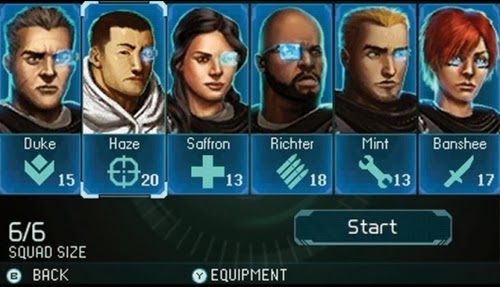
Ghost Recon is a turn based strategy game that gives you a team of at most six soldiers from different classes. The balance might be a bit off for some of them, because I found myself relying heavily on a subset of the team: Banshee, the scout with invisibility and a hella-powerful knife; Mint, who can deploy drones; Haze, the sniper; and Saffron the medic. Although I suppose it was good in the sense that I became more attached to these characters and selected them in every possible case. The levels are reasonably varied, and will occasionally require one to think well before acting. You can capture Command Points and spend the accumulated points on extra turns, energy, or a deadly airstrike.

As the team members level up, you can assign points to them and unlock better weapons or stats. Each character has a primary and secondary weapon, so there is a reasonable amount of variety to keep things fresh. The medic (and the Command Centre) allows an extra turn for a player, so it is great fun chaining attacks with someone like Banshee. The difficulty spikes up a bit when drones are introduced midway through the game, and evens out when you change your play style and weapon loadout accordingly.

This kind of game is perfect for a handheld – playable in short bursts, not a nightmare on the battery, and fresh enough to be enjoyable all through.


Parse crontabs in DuckDuckGo

My favourite search engine recently released a way to create and add plugins to their zeroclick info box. There are some good examples and a starting guide in the DuckDuckHack website. I checked out their Ideas page and picked up something that looked useful and fairly easy to implement: parsing a crontab into a human readable output.

Implementing it took about a day, and showed me how insanely useful CPAN is. The DDG folks were nice enough to add unit tests and tweak the code a bit, and have now released it on their website.

ddg-crontab-thumb-500x86-18

Good link roundups on the web

Newsletter 4/29

Pic vaguely related (Photo credit: Christopher S. Penn)

There are some very good blogs and newsletters that post (somewhat) weekly summaries of interesting links. Here are the ones I follow regularly:

That should be enough for now. Sign up, subscribe and have fun!

Enhanced by Zemanta

Collusion

collusion-thumb-500x392-15

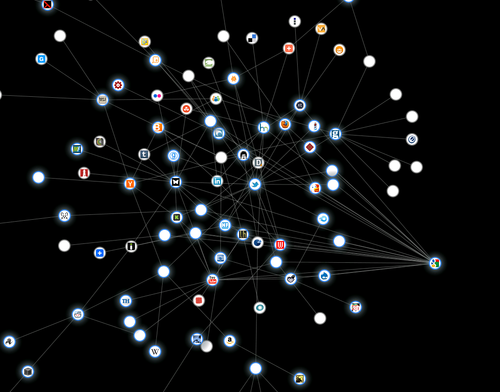
The folks at the Guardian released a Firefox addon recently. Called Collusion, it silently tracks third party sites that track users across multiple sites. I’ve run it for something like two days so far, and its depressing how I’ve littered my trail all over the web. The UI is very nicely done, and highlighting an icon shows all the sites it connects to and greys out the rest.

Related articles

Enhanced by Zemanta

My Email Client is my RSS Reader

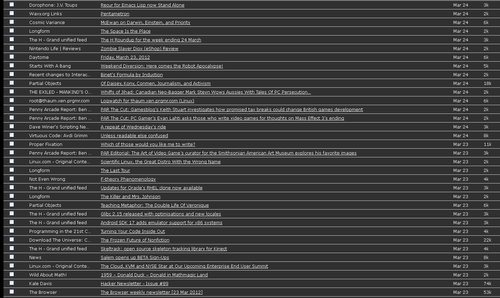
rss2email is a kick-ass RSS solution that I’ve been using for quite awhile now. It works exactly the way it sounds: You provide it a list of feeds, and it mails you hourly when one or more of them get updated. I now have 100+ feeds added to it. Every morning I log in and skim through the 30-40 emails that come straight to my ‘alerts’ folder. Here is what a random day’s email looks like for me:
I hit 10000 mails in this folder last week. Here is what I’ve learnt:

r2e-thumb-500x298-12
  • Don’t use this to subscribe for web sites that update frequently. I have direct bookmarks for sites like the Guardian and Metafilter.
  • Pictures/Videos don’t work too great. Obviously, because any decent email client blocks external images.
  • Some good sites have feeds for specific tags in case you don’t want the rest of the content. Not Exactly Rocket Science’s great link round up is a fine example.

I’m always on the lookout for newer feed readers, but this is the one I’ve settled with quite comfortably.