Cleaning Up

So.. Prism was a wake up call. I’ve been looking to move to more privacy-centric sites for some time now, and this weekend I also decided to cut down on my spending at the same time. I’ve been spending close to $200 on my VPS, email hosting and domain every year. This seemed like overkill for a site that only I visited, although I found the VPS very useful for installing feed readers, analytics, and so on. Anyway, I couldn’t expect a transition to be completely pain free.

I’ve decided to cut back on services hosted in the US, so the VPS was the first to go. I’m now typing this on a free Gandi blog (who handle my domain already). I might switch over to a VPS at Gandi itself, once the dust settles down. The webmail was next: I have no complaints with Fastmail but I decided to move simply for reasons of cost. Gandi, again, has a simple mail service that I’ve switched to for now.

Both my VPS and email are paid up for a few more months so I can always switch back if the transition is too annoying. More importantly, I spent a few hours deleting my accounts in a ton of sites. Accountkiller was a very useful resource, as it tells you which sites require you to delete your data before removing the account, provides direct links to the account deletion page, and so on.

Clipperz Password manager

A few weeks back I posted a list of services I used heavily, and my password manager, LastPass was the most worrying in the list.. both because of how accustomed to it I was, and due to it’s proprietary nature. It is with some relief that I can now remove that from my list of concerns. Say hello to Clipperz.

Clipperz may be like LastPass superficially: both are zero-knowledge online password managers where the encryption happens on the client side and only encrypted data is stored and sync’d on the server. The similarities end there.

Clipperz is committed to Free software, and their code is open source and available to any one who wants to self host. Passwords are stored in ‘cards’, and auto login is provided by setting up ‘Direct Logins’ for each card. Since the scrambled password is easy to copy and paste from the card itself, I don’t use the Direct Logins feature much.

An offline version allows you to download the entire database in a self contained html file, which is useful for backups and rare offline moments.

Clipperz is now accepting registrations through Bitcoin only, in an effort to further anonymize the service. I signed up when they were still a free service, and have still not started experimenting with Bitcoin. The developers — a couple of friendly guys in Italy — were nice enough to help me with it.

All in all, it is a pleasure to see such a useful, well built tool from such nice, principled folks.

Collusion

collusion-thumb-500x392-15

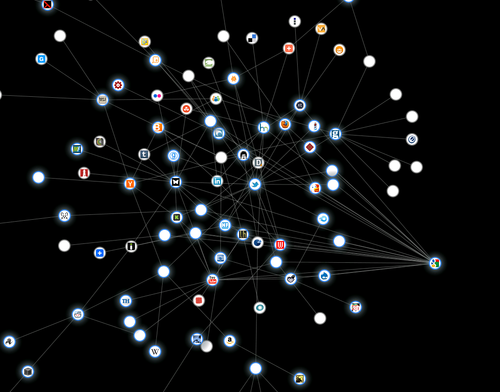
The folks at the Guardian released a Firefox addon recently. Called Collusion, it silently tracks third party sites that track users across multiple sites. I’ve run it for something like two days so far, and its depressing how I’ve littered my trail all over the web. The UI is very nicely done, and highlighting an icon shows all the sites it connects to and greys out the rest.

Related articles

Enhanced by Zemanta

5 reasons why DuckDuckGo is an awesome search engine

I’ve been using DuckDuckGo for awhile now and I’ve found some great things about it. Here are 5 reasons why it’s amazing:

ddg-chatbot_thumb
ddg-infobox_thumb
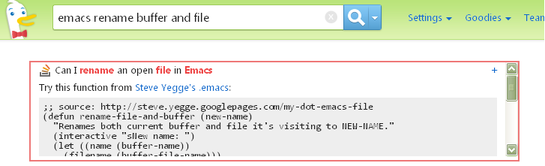
  1. Awesome infobox: This is the tiny box that’s the first thing you see in your search results. It usually links to the wikipedia page if one exists, and provides a one-line summary of your search term. This works surprisingly well sometimes. For instance, I wanted an Emacs function to rename both a buffer and it’s associated file. I badly need this because I write these posts as filename.txt.draft, and then need to rename it to filename.txt so that Blosxom shows it as a post. This is what DDG showed me when I searched for it (above).
  • !Bang: This is a great idea, implemented comprehensively. In short, keywords prefixed by a ! are redirected to a specific site. e.g. !w and !hn send your search queries to wikipedia and hnsearch.com respectively.
  • Privacy: This is so obvious it ought to be the very first point. They’ve created a couple of nice illustrated explanations on how they don’t Bubble or Track their users.
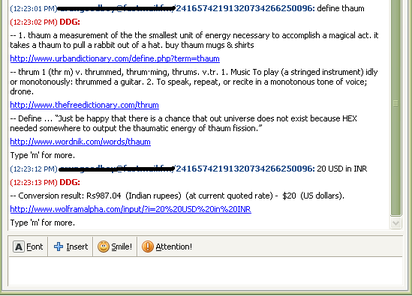
  • They have a chatbot that you can send your search queries to, directly. Add im@ddg.gg and try it out for yourself. Here is what it looks like (pic2 above, until I can figure out Blogger’s attachment quirks)
  • Their ‘I’m Feeling Lucky’ option is called ‘I’m Feeling Ducky’ 🙂