
Strunk & White today

As someone who suffers from perennial writer’s block, Strunk & White does nothing to help. I spent thrice the usual time thinking up the post title. Could it be terser? Does it convey the primary content of the post? Should it mention the Elements of Style is also adorably funny on occassion?

I hadn’t read the book before but had come across more than enough posts declaring its demise. I’ve read it now and thoroughly enjoyed it. I love when people have strong opinions and its authors have them in abundance. I suppose its detractors forget that the title is ‘The Elements of Style’ and not ‘The-mandatory-guide-to-perfect-English-and-everything-else-is-wrong’. The authors themselves frequently advise rather than mandate, and acknowledge that language is fluid and bound to change with the times. Why nitpick then? We’re all grown ups here–we should learn to enjoy a book while knowing how to separate its outdated advice from the relevant bits.

I love it most for its terseness. It reminds me of reading a man page. Brimming with content, but precise.  Any one who has been through the education system knows the drivel that students are encouraged to vomit in every exam. This ‘skill’ is a pain to unlearn and lives on in mediocre minds in their profession as well.  Read that link and weep.

Better to end with Strunk himself, rather than the atrocious text in that link.

Vigorous writing is concise. A sentence should contain no unnecessary words, a paragraph no unnecessary sentences, for the same reason that a drawing should have no unnecessary lines and a machine no unnecessary parts. This requires not that the writer make all sentences short, or avoid all detail and treat subjects only in outline, but that every word tell.
Cleaning up docker cruft

Here’s a quick tip I discovered recently:

I was tired of having complex shell commands to look at docker’s dead containers and unused images. Happily, new versions (API v1.25 onwards) have simple equivalents:

docker system prune
docker container prune
docker network prune
docker volume prune

Here’s a link to the documentation.

Code exploration in C with GNU GLOBAL

For a long time I’ve been getting by with using cscope at work. I’m not a great C programmer by any stretch, and I need to have multiple windows open and a note book by my side to get any sort of understanding of the code.

globals
GLOBAL’s HTML output

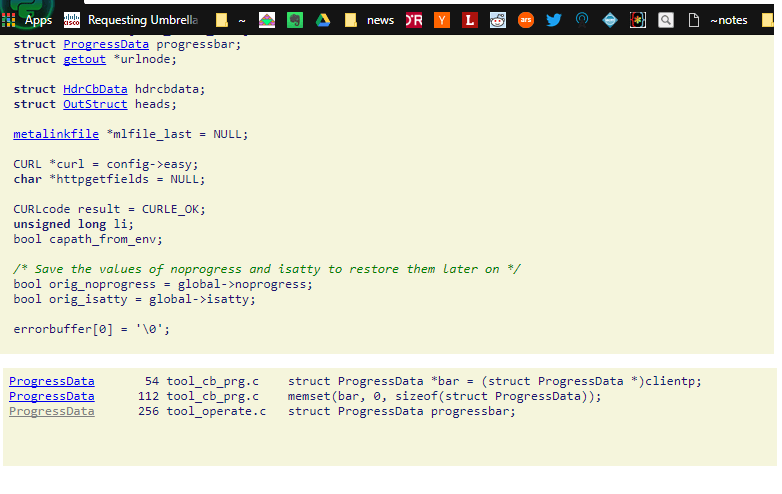
So I was happy to discover GNU GLOBAL recently. Getting it setup is a matter of running gtags on the root of the repository. Running htags also produces nice HTML files that make it much easier to browse through.

It has quite a few integrations as well. The snippet I added to my emacs init.el is as follows:

;; gtags/gnu globals
(setq load-path (cons "/usr/share/emacs/site-lisp/" load-path))
(autoload 'gtags-mode "gtags" "" t)
(setq c-mode-hook
 '(lambda ()
 (gtags-mode 1)
 ))
(setq gtags-suggested-key-mapping t)
(setq gtags-auto-update t)

Here is a table that compares similar tools.

Searching notes in Emacs with Deft

I have mentioned the notes system I use already. I use GNU/Emacs heavily and have come up with a neat system that fits my needs. I take notes in org-mode, commit them using git and occasionally publish them to html if I need a clean look at all of them.

For information retrieval, I use Deft in GNU/Emacs. I have it configured with the following snippet in my init.el:

;;deft for notes
(require 'deft)
(setq deft-extensions '("txt" "tex" "org"))
(setq deft-directory "~/notes")
(setq deft-recursive t)
(global-set-key [f8] 'deft)

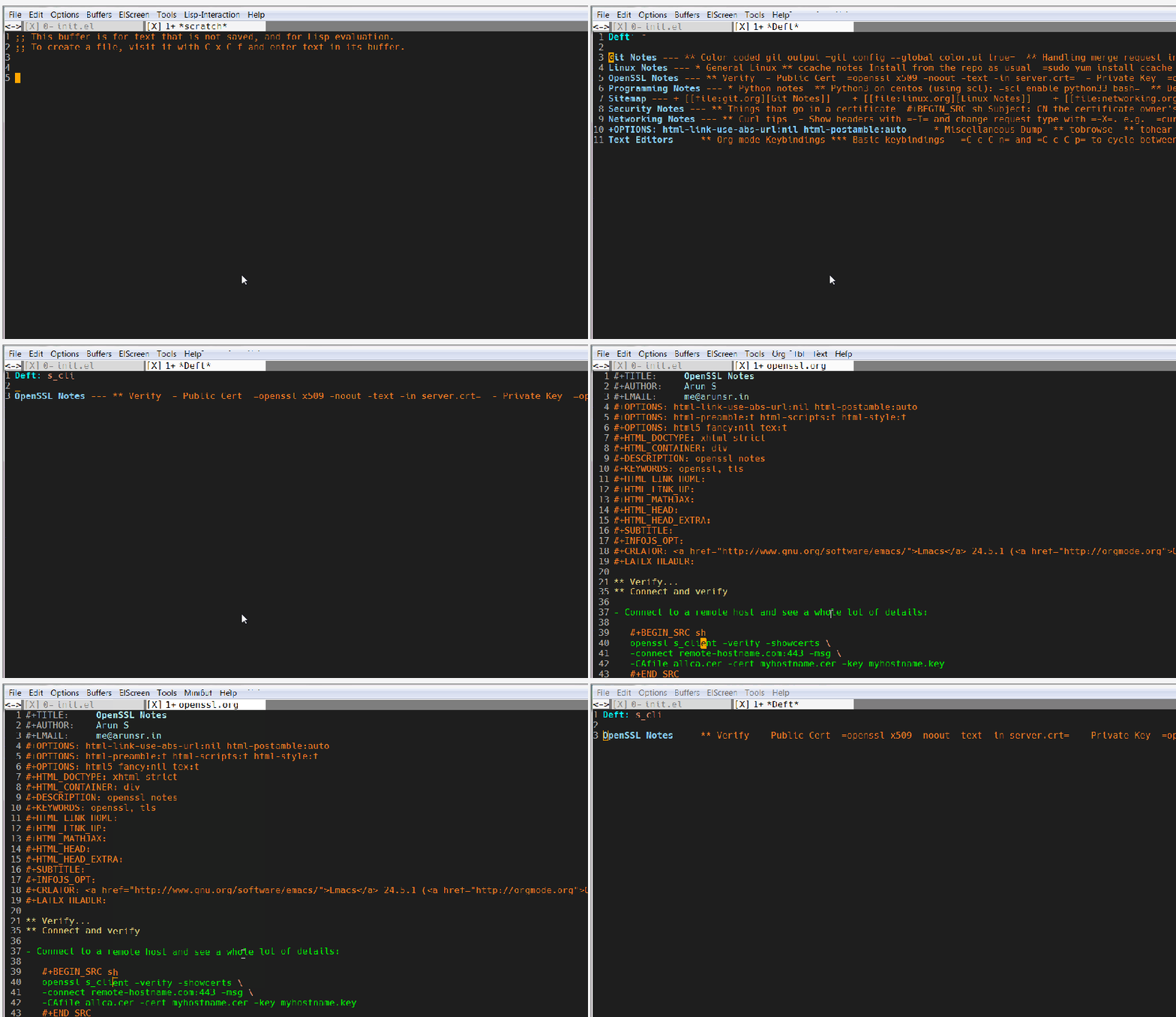
Whenever I need to dig something up, I hit F-8 and type a string of text and that’s pretty much it. Deft recursively searches for the string and narrows the files down to the hits.

Here’s a quick gif of me searching for ‘s_client’ so I can see the exact args I need to use for openssl’s TLS client.

deft

Ten years ago

animal_farm_2

I wanted to go to some unrelated site starting with blog and hit enter once those 4 letters were typed, and was pleasantly surprised to see it go to a blog I’d set up for about a year between 2006 and 2007.  Forgive the cringe-worthy name. I’m all grown up and traditional now. I’m happy to see I was as obsessed with RSS readers, Alan Moore, Emacs , bookmark hoarding and Linux back then as I am now.

The only difference is that I was a loyal Slackware user back then despite distro-hopping constantly, but I prefer Fedora these days.

The picture above is something I made in Gimp back then.

AsyncIO Python Pitfalls

In an earlier post I mentioned switching my code to use Python3’s Async/Await and not seeing any noticeable improvements. In an article on LWN this week the answer popped out:

Much of the Python standard library is written in blocking fashion, however, so the socket, subprocess, and threading modules (and other modules that use them) and even simple things like time.sleep() cannot be used in async programs. All of the asynchronous frameworks provide their own non-blocking replacements for those modules, but that means “you have to relearn how to do these things that you already know how to do”, Grinberg said.

(From An introduction to asynchronous Python )

That’s an annoyance that I can’t easily fix if I use other libraries that internally use these blocking modules. So I’ll need to see if I can break down the logic into smaller chunks and write asnyc versions for some parts at least (e.g. the fetching of a webpage if not for the pdf conversion, or by calling a subprocess asynchronously instead of using the existing blocking library).

The docs have sections for async transports, protocols, subprocesses and so on, so I’ll need to spend some time looking at it before I proceed.

More to come when I make some progress.