thaum ~$ vrms
No non-free or contrib packages installed on ! rms would be proud.
thaum ~$
More here.

thaum ~$ vrms
No non-free or contrib packages installed on ! rms would be proud.
thaum ~$
More here.
thaum ~$ vrms

	No non-free or contrib packages installed on <snip>!  rms would be proud.
thaum ~$
More here.
Bash has tons of stuff that can really make one productive on the terminal. If you just moved into a folder and want to quickly switch back to the one you came from, cd - does the job.
Here’s an example:
thaum:/etc/apache2# cd /var/log/apache2/
thaum:/var/log/apache2#
thaum:/var/log/apache2# # do something
thaum:/var/log/apache2#  cd – /etc/apache2
thaum:/etc/apache2#
That works out for simple tasks, but there’s a lot more. Say hello to pushd. Bash has a directory stack that holds your current working directory. Call pushd with another path and it gets added to the stack. Repeat as many times as needed and you get a pile of directories that you can switch to immediately. popd removes the current entry from the stack.
This is how it works:
thaum:/etc/apache2#			### I want to switch between my logs and my etc now, so I start with this
thaum:/etc/apache2# pushd /var/log
/var/log /etc/apache2
thaum:/var/log# cd apache2
thaum:/var/log/apache2#			### I can go to other folders now and the stack is updated accordingly
thaum:/var/log/apache2# # do something
thaum:/var/log/apache2#
thaum:/var/log/apache2# pushd /var/www	### Add my apache root folder to the stack as well
/var/www /var/log/apache2 /etc/apache2	### Three entries are now available!
thaum:/var/www#
thaum:/var/www# # do something else
thaum:/var/www#
thaum:/var/www# pushd +2		### I want to go back to my /etc folder, so I call pushd with the +2 arg
/etc/apache2 /var/www /var/log/apache2
thaum:/etc/apache2#
thaum:/etc/apache2# pushd		### Without any args, it goes to the most recent directory in the stack
/var/www /etc/apache2 /var/log/apache2
thaum:/var/www#
At work I organize something like this for a set of commonly used folders in a screen session, and it really helps. It’s a bit of a bother typing pushd +2 or pushd +3 each time, so I also have the following aliases to really speed things up.
 function    pd                { pushd $@; }
 function    pd2               { pushd +2 $@; }
 function    pd3               { pushd +3 $@; }
Now I just do a pd /path/to/file and pd2, pd3 etc to swap between them.
Now what do we have here?
thaum ~$ uptime
13:51:03 up 150 days, 18:19, 2 users,  load average: 0.00, 0.00, 0.00
thaum ~$
Back when I was running Linux on my desktop, I used to see how long I could leave it running before a damn power cut took it down. I think the max I hit was between 25 and 30 days — something or the other would always end up causing a reload/shutdown.
I’ve bothered less about these things since then, but I was nevertheless happy to see the above output on my VPS (hosted by the great guys at prgmr.com).
I signed up to Kongregate over the weekend and re-discovered my love for Tower Defense games. I already have quite a few on Steam that I’ve either not played at all, or tried just a bit: Plants vs Zombies, Defense Grid, Sanctum, Revenge of the Titans, and so on.
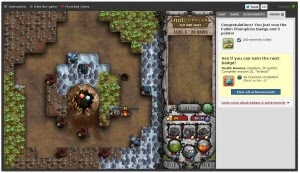
Here are the ones that Kongregate has. I spent some time trying a few of them, and this one is my favourite so far is Cursed Treasure: Don’t Touch My Gems! It looks like this:
And now I’m addicted. Next up in my wish list is probably something like Immortal Defense.
Here’s a quick animation I did with Inchworm Animation on my 3DS. It took about half an hour maybe. The tutorial works great to explain the features, and apart from minor confusion in how individual layers could be split into frames, I got a hang of the rest of the UI pretty easily.