Look up a word’s definition in Emacs

Here’s a quick lisp snippet I found in my .emacs. I put it together some time back and referenced this great site in the comments.

  (defun word-definition-lookup ()
"Look up the word under cursor in a browser."
(interactive)
(browse-url
(concat "http://www.google.co.in/search?hl=en&q=define%3A"
(thing-at-point 'word)))
)

The above code is called with an M-x word-definition-lookup

It causes Emacs to use google’s define keyword for the word at point. It ought to use the system’s default browser to do this.

Making dotemacs consistent across platforms

My .emacs file has gotten pretty messy over the years. I try out new .el packages on a whim and forget about them. I use emacs extensively on my office laptop (running windows XP), but only for note taking. On my VPS and at home, I use it a bit less, but for different purposes (learning to code, editing html and config files, and so on).

I finally sat down and unified the .emacs files for all these boxes yesterday. I removed pretty much everything that was slowing startup down. The main fix was to have this conditional statement (I don’t know where on the net I got this from):

(cond
((string-match "GNU" (emacs-version))
(message "customizing GNU Emacs")
;; put all the GNU Emacs specific customization in here
;; But first do the things which depend on the OS:
;; setting the load-path and
;; loading packages available only for a certain OS
(cond
((string-match "linux" system-configuration)
(message "customizing GNU Emacs for Linux")
;; anything special about Linux begins here
;; and ends here
)
((string-match "nt" system-configuration)
(message "customizing GNU Emacs for Win NT")
;; anything special about Windows begins here
;; and ends here
)
;; anything special for the OS ends here
)
;; all the common things for different OS start here
)
)

Here is my full dotemacs now. The next step is to version control this and a few other common configuration files.

Emacs bindings in Windows with Xkeymacs

I’ve been trying to learn GNU Emacs for quite awhile, and while I first started, I needed something to get me used to the bindings (I’d been using vi pretty much exclusively before). That’s when I found Xkeymacs.

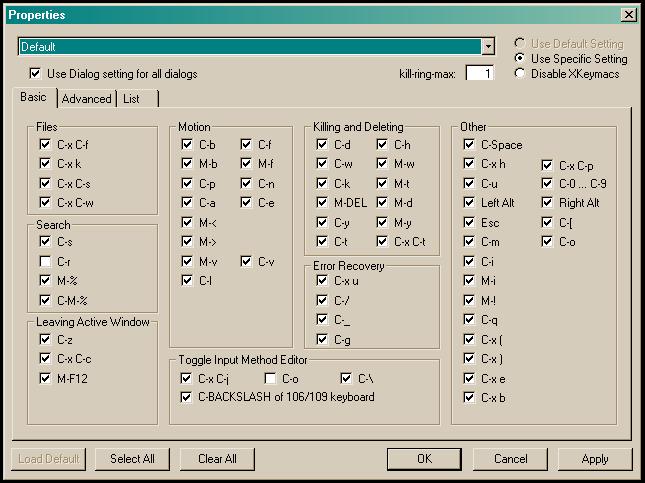
Its made for windows, so I use it at office, and the little gem works wonderfully. It sits unobstrusively in the task bar, and gives emacs-style bindings for literally every window running on your desktop. I get a happy satisfaction when I can use Emacs bindings in MS Word: stuff like Alt+D (Delete word), Ctrl+K (Kill line), Ctrl+Space (Start mark)… pretty much everything in Emacs apart from the Alt+x combinations.

xkeymacs

Pretty much everything is configurable, on a per-window and per-binding basis. For example, I’ve disabled it for my Outlook for no particular reason. Also, I use Alt+D pretty frequently in Firefox to reach the URL bar, so that’s disabled too. If you’re going to run a game or something, you can quickly turn the whole thing off with Ctrl+Q.

And to top it all off, it also gives a keyboard layout to remap your keys. As any Emacs user will tell you, the very thing to do is to switch the Ctrl and Caps Lock keys. I very highly recommend this little app to people stuck in a windows box who still like having their Emacs bindings around.