Signed up for the FSF (again)

I was an FSF Associate Member some time back and decided to pause for financial reasons. Things are maybe a little bit better nowadays, and rather than signing up for mindless consumption (Marvel Unlimited, Scribd and Netflix have got my money in recent months), I decided to put my money back in something worthwhile.

(image credit)

I’ve been getting some email alerts from them in the past few weeks and those did the trick. Here’s a quick summary of things the FSF and GNU are busy with that I’m interested in:

Stallman is always right: the only difference is whether people realize it immediately or in the long run — after getting burnt by proprietary software, walled gardens, and assaults on privacy. The FSF is following his vision in promoting truly Free software and deserves everyone’s support.

Vim with Vundle

Full credit to this amazing post: it made my .vimrc so much neater and understandable. Until now I had a mess of plugins pulled from different sources, and I didn’t know which extension was enabling which feature.


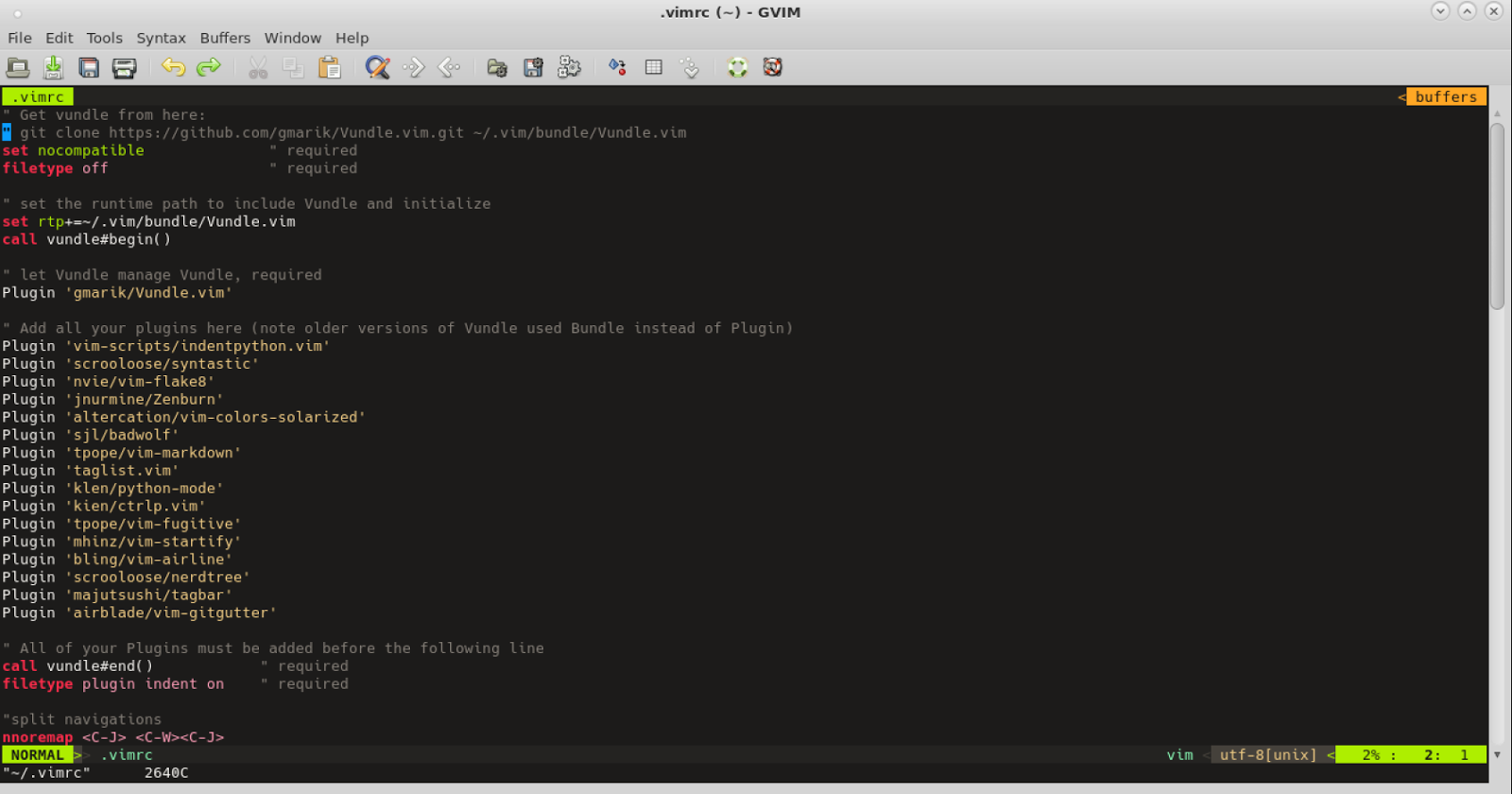
Below is my full .vimrc, mostly identical to the one in the post, with a few minor tweaks that I’m used to. I copied this to a couple of VMs I use, and it is ridiculously simple to clone the Vundle repo and hit :PluginInstall to get everything set up nicely.

" Get vundle from here:
" git clone https://github.com/gmarik/Vundle.vim.git ~/.vim/bundle/Vundle.vim
set nocompatible              " required
filetype off                  " required

" set the runtime path to include Vundle and initialize
set rtp+=~/.vim/bundle/Vundle.vim
call vundle#begin()

" let Vundle manage Vundle, required
Plugin 'gmarik/Vundle.vim'

" Add all your plugins here (note older versions of Vundle used Bundle instead of Plugin)
Plugin 'vim-scripts/indentpython.vim'
Plugin 'scrooloose/syntastic'
Plugin 'nvie/vim-flake8'
Plugin 'jnurmine/Zenburn'
Plugin 'altercation/vim-colors-solarized'
Plugin 'sjl/badwolf'
Plugin 'tpope/vim-markdown'
Plugin 'klen/python-mode'
Plugin 'kien/ctrlp.vim'
Plugin 'tpope/vim-fugitive'
Plugin 'mhinz/vim-startify'
Plugin 'bling/vim-airline'
Plugin 'scrooloose/nerdtree'
Plugin 'majutsushi/tagbar'
Plugin 'airblade/vim-gitgutter'

" All of your Plugins must be added before the following line
call vundle#end()            " required
filetype plugin indent on    " required

"split navigations
nnoremap  
nnoremap  
nnoremap  
nnoremap  

" tagbar at F8
nmap  :TagbarToggle

" my favourite font
set guifont=Hack:h11:cANSI

" markdown mode for .page files
autocmd BufNewFile,BufReadPost *.md set filetype=markdown
autocmd BufNewFile,BufReadPost *.page set filetype=markdown

set nofoldenable    " disable folding

" python settings
au BufRead,BufNewFile *.py,*.pyw set tabstop=4
au BufRead,BufNewFile *.py,*.pyw set softtabstop=4
au BufRead,BufNewFile *.py,*.pyw set shiftwidth=4
au BufRead,BufNewFile *.py,*.pyw set textwidth=79
au BufRead,BufNewFile *.py,*.pyw set expandtab
au BufRead,BufNewFile *.py,*.pyw set autoindent
" au BufRead,BufNewFile *.py,*.pyw match BadWhitespace /^\t\+/
" au BufRead,BufNewFile *.py,*.pyw match BadWhitespace /\s\+$/
au         BufNewFile *.py,*.pyw set fileformat=unix
au BufRead,BufNewFile *.py,*.pyw let b:comment_leader = '#'

" General settings
set tabstop=4        " number of visual spaces per TAB
set softtabstop=4 " number of spaces in tab when editing
set expandtab        " tabs are spaces
set wildignore=*.o,*~,*.pyc
set encoding=utf-8

let python_highlight_all=1
syntax on
colorscheme badwolf
let NERDTreeIgnore=['\.pyc
, '\~
] "ignore files in NERDTree
set ignorecase
set paste
set nohlsearch
set incsearch
nmap  a=strftime("%A %Y%m%d")
imap  =strftime("%A %Y%m%d")
:set pastetoggle=
set laststatus=2 "airline needs this
let g:airline#extensions#tabline#enabled = 1
let g:ctrlp_custom_ignore = '\v[\/]\.(git|hg|svn|pyc)

Writing service files in systemd

image source image source

Systemd may not be the most popular init system out there, and it still manages to annoy me every now and then, but I had a chance to play with it at work recently. A deeper dive into it has left me a little happier with how it handles things.

My requirement was to daemonize a service and have it running at startup. The service has a few command line arguments, and also needs some environment variables set. The command line args could change but should not expect someone to reconfigure the init script. Systemd supported all these requirements out of the box.

Here is what the service file looked like:

[Unit]
Description=myservice
[Service]
Environment="LD_LIBRARY_PATH=/usr/local/lib:$LD_LIBRARY_PATH"
EnvironmentFile=/etc/
ExecStart=/usr/bin/myservice ${arg1} ${arg2} ${arg3}
[Install]
WantedBy=multi-user.target

The EnvironmentFile has name value pairs of the command line arguments:

arg1=foo
arg2=bar
arg3=baz

There are numerous others configuration parameters for the service. For instance, set Type=oneshot if the application is not a daemon and is going to exit immediately.

Use ExecStartPost for running additional scripts after the first one starts (e.g. maybe you want to write to a pidfile). ExecStartPre, ExecStopPost and ExecStopPre also exist.

The unti file must be present in /etc/systemd/system. To make it run on subsequent boots:

systemctl enable myservice

To start the service:

systemctl start myservice

To check the service’s logs:

journalctl -u myservice

Further reading:

Writing service files in systemd

image source
image source

Systemd may not be the most popular init system out there, and it still manages to annoy me every now and then, but I had a chance to play with it at work recently. A deeper dive into it has left me a little happier with how it handles things.

My requirement was to daemonize a service and have it running at startup. The service has a few command line arguments, and also needs some environment variables set. The command line args could change but should not expect someone to reconfigure the init script. Systemd supported all these requirements out of the box.

Here is what the service file looked like:

[Unit]
 Description=myservice
[Service]
 Environment="LD_LIBRARY_PATH=/usr/local/lib:$LD_LIBRARY_PATH"
 EnvironmentFile=/etc/<somefile.cfg>
 ExecStart=/usr/bin/myservice ${arg1} ${arg2} ${arg3}
[Install]
 WantedBy=multi-user.target

The EnvironmentFile has name value pairs of the command line arguments:

arg1=foo
arg2=bar
arg3=baz

There are numerous others configuration parameters for the service. For instance, set Type=oneshot if the application is not a daemon and is going to exit immediately.

Use ExecStartPost for running additional scripts after the first one starts (e.g. maybe you want to write to a pidfile). ExecStartPre, ExecStopPost and ExecStopPre also exist.

The unti file must be present in /etc/systemd/system. To make it run on subsequent boots:

systemctl enable myservice

To start the service:

systemctl start myservice

To check the service’s logs:

journalctl -u myservice

Further reading: