thaum ~$ vrms
No non-free or contrib packages installed on ! rms would be proud.
thaum ~$
More here.
thaum ~$ vrms
No non-free or contrib packages installed on ! rms would be proud.
thaum ~$
More here.
thaum ~$ vrms

	No non-free or contrib packages installed on <snip>!  rms would be proud.
thaum ~$
More here.
Bash has tons of stuff that can really make one productive on the terminal. If you just moved into a folder and want to quickly switch back to the one you came from, cd - does the job.
Here’s an example:
thaum:/etc/apache2# cd /var/log/apache2/
thaum:/var/log/apache2#
thaum:/var/log/apache2# # do something
thaum:/var/log/apache2#  cd – /etc/apache2
thaum:/etc/apache2#
That works out for simple tasks, but there’s a lot more. Say hello to pushd. Bash has a directory stack that holds your current working directory. Call pushd with another path and it gets added to the stack. Repeat as many times as needed and you get a pile of directories that you can switch to immediately. popd removes the current entry from the stack.
This is how it works:
thaum:/etc/apache2#			### I want to switch between my logs and my etc now, so I start with this
thaum:/etc/apache2# pushd /var/log
/var/log /etc/apache2
thaum:/var/log# cd apache2
thaum:/var/log/apache2#			### I can go to other folders now and the stack is updated accordingly
thaum:/var/log/apache2# # do something
thaum:/var/log/apache2#
thaum:/var/log/apache2# pushd /var/www	### Add my apache root folder to the stack as well
/var/www /var/log/apache2 /etc/apache2	### Three entries are now available!
thaum:/var/www#
thaum:/var/www# # do something else
thaum:/var/www#
thaum:/var/www# pushd +2		### I want to go back to my /etc folder, so I call pushd with the +2 arg
/etc/apache2 /var/www /var/log/apache2
thaum:/etc/apache2#
thaum:/etc/apache2# pushd		### Without any args, it goes to the most recent directory in the stack
/var/www /etc/apache2 /var/log/apache2
thaum:/var/www#
At work I organize something like this for a set of commonly used folders in a screen session, and it really helps. It’s a bit of a bother typing pushd +2 or pushd +3 each time, so I also have the following aliases to really speed things up.
 function    pd                { pushd $@; }
 function    pd2               { pushd +2 $@; }
 function    pd3               { pushd +3 $@; }
Now I just do a pd /path/to/file and pd2, pd3 etc to swap between them.
Now what do we have here?
thaum ~$ uptime
13:51:03 up 150 days, 18:19, 2 users,  load average: 0.00, 0.00, 0.00
thaum ~$
Back when I was running Linux on my desktop, I used to see how long I could leave it running before a damn power cut took it down. I think the max I hit was between 25 and 30 days — something or the other would always end up causing a reload/shutdown.
I’ve bothered less about these things since then, but I was nevertheless happy to see the above output on my VPS (hosted by the great guys at prgmr.com).
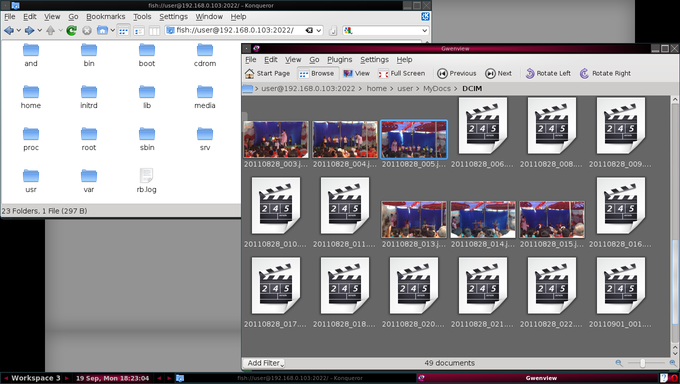
I was cleaning up and backing some pics on my phone, and needed a quick way to view and delete a bunch of them. Well I’m on linux, and KDE has always had an amazing suite of applications, so it was no surprise that there was an easy way out. Konqueror supports the ‘FISH’ protocol to transparently handle files over ssh. I just had to enter
this:
fish://user@192.168.0.103:2022
And I get a perfectly normal konqueror window that shows all the files on my phone :)
This is what it looks like:
Pre-2004
I started life out on a PC running DOS and Windows 3.x. This was before I had dial-up, so my memories of it are of me mostly playing with MS Paint and some old games. The box was later upgraded to one running Win95, and I spent most of my time trying out shareware programs. Most of these memories are largely forgettable, and I mourn the opportunities I missed by running a mediocre OS.
2004
My first encounter with a Real OS, when I got my first job in Bangalore. Our development environment was Solaris, and I quickly made friends with the sysadmin. There were frequent jaw-dropping moments when I caught vague glimpses of the power of the terminal. I devoured anything the admin could teach me, and was a convert from then on.
2005-2008
This was the experimentation phase, and such joyous days they were. I shipped my computer over to Bangalore and learned to dual-boot. The company I was working for had a well-stocked library, and there were a few Linux publications available that used to (and still do) release a distro in every month’s edition.
The usual process was to get a CD, run home and install it, and then get stuck immediately with something I had no idea about. These were frustrating, but ultimately rewarding days. I had a dial-up connection that I never really could configure, so I had to note down errors on a piece of paper, research them at office the next day, and write down multiple possible fixes to try when I returned.
I tried every distro I could get my hands on, and I never felt at home when I wasn’t using Slackware. This became my primary OS for quite a while. By this time I also had broadband, and life was good.
2008-Present
Once I settled with Slackware, I didn’t experiment much with other distros. But the old restlessness always comes back. I tried FreeBSD on a whim, and had another jaw dropping moment. I’d never seen anything as polished as its Ports system, and I fell in love again.
Then my trusty PC gave up in 2010 and it was time for a new box. I regrettably went with Win7 this time, and went through a brief but active gaming phase. Not wanting to dual boot, I bought a VPS and installed Debian on it. At least I always had a Linux box at my finger tips this way. This was also when I bought my Nokia N900, which runs
Maemo (a spin-off of Debian).
Most recently, I’ve installed Debian in VirtualBox, and I always run it at full screen and do all my work from within it. I also have a test installation of Linux From Scratch, and VirtualBox’s snapshots are a boon here. Debian feels solid, and I’ve never had any problems on it, either on the server or the desktop. I’m quite comfortable as a
sysadmin, but the plan now is to pick up some programming skills. I’ve got books on Assembly, C and Scheme, and I’m going through them in whatever order pleases me.

