
Test driving ownCloud

I’ve wanted something like this for some time, so I’m glad I met this beautiful project called ownCloud. It is an open source cloud storage service that has some pretty neat features.

The installation was laughably easy: I just ftp’d and extracted the zip file to my www root and provided a username and password in the install page that came up. That was it. It took me quite a bit longer to get webdav working in my stupid windows pc. Anyway I wasn’t too keen on the synchronization aspect so I didn’t bother with it too much. FTP’ing some music and pictures directly to my account’s data directory was sufficient for my purposes.

This is where the project starts to shine. An in-built media player allows music to be streamed automatically. It even persists when navigating to other sections in the ownCloud page (there’s just a momentary skip between page loads). Similarly, uploaded pictures show up automatically in a gallery. For text files, there’s an in-built text editor that refused to work for me (saving a file ended up in a 0 byte file.. maybe a permission problem?)

That’s not the end of it, so far I can see that it has facilities for bookmarks, calendaring, address books, sharing, and so on. Although it occasionally feels buggy, it does a fine job on the whole.
Lightweight galleries with llgal

I’ve been meaning to install a gallery in this site for some time now. I’ve previously used and liked Zephoto. Nothing very new seems to have come up since then, apart from something like Piwigo.

Anyway, since Blosxom is the happiest experience I’ve had with a blogging engine, I was happy to come across an equally elegant solution for web galleries: llgal. This is just a single CLI that most distros ought to come with. Setup is mind numbingly easy, all I had to do was cd to the folder with pictures and type:

llgal —title="n900"

And that got me this gallery. Could anything be simpler? the only other thing I wanted was decent authentication. Well, I have an SSL cert for this site so Basic Auth + SSL could have been enough. Anyway, I decided to try out Digest Authentication this time. Configuration is as easy as it is for Basic. I used the Apache documentation as a reference and didn’t face any problems.

So there it is. A light-weight, clean image gallery in one command. No php/mysql weirdness, no constant upgrades, no hassle.

5 reasons why DuckDuckGo is an awesome search engine

I’ve been using DuckDuckGo for awhile now and I’ve found some great things about it. Here are 5 reasons why it’s amazing:

ddg-chatbot_thumb
ddg-infobox_thumb
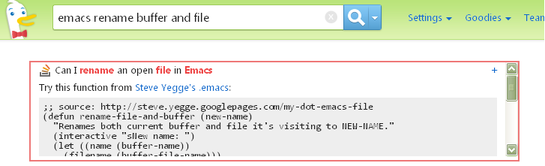
  1. Awesome infobox: This is the tiny box that’s the first thing you see in your search results. It usually links to the wikipedia page if one exists, and provides a one-line summary of your search term. This works surprisingly well sometimes. For instance, I wanted an Emacs function to rename both a buffer and it’s associated file. I badly need this because I write these posts as filename.txt.draft, and then need to rename it to filename.txt so that Blosxom shows it as a post. This is what DDG showed me when I searched for it (above).
  • !Bang: This is a great idea, implemented comprehensively. In short, keywords prefixed by a ! are redirected to a specific site. e.g. !w and !hn send your search queries to wikipedia and hnsearch.com respectively.
  • Privacy: This is so obvious it ought to be the very first point. They’ve created a couple of nice illustrated explanations on how they don’t Bubble or Track their users.
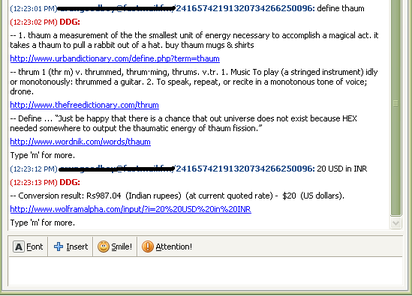
  • They have a chatbot that you can send your search queries to, directly. Add im@ddg.gg and try it out for yourself. Here is what it looks like (pic2 above, until I can figure out Blogger’s attachment quirks)
  • Their ‘I’m Feeling Lucky’ option is called ‘I’m Feeling Ducky’ :)

Learning Javascript with Codecademy

This has been making the rounds lately, and I decided to sign up and give it a whirl — a website called Codecademy that teaches Javascript by throwing you into a terminal so you can practise the commands yourself.

Similar to Khan Academy (and a lot of games), the site implements achievements to reward one’s progress. Mine can be seen in my profile page. It didn’t take too long to finish both the lessons that are currently available. It does look like they plan to implement more exercises soon, so that’s good news.

The hands-on approach works great for programming languages, and it is implemented pretty nicely in this site. I’m looking forward to see new languages in the same format — this is the kind of thing I’d happily pay for.

Giving back to Project Gutenberg

Michael Hart, the founder of Project Gutenberg, is no more. Anybody who’s lived on the internet knows how valuable his project is. I’ve certainly downloaded a ton of stuff from the site in the past few years (I have a Sony Touch reader), but I’ve not contributed anything back.

Today I discovered their Distributed Proofreaders site. The premise is simple. Someone collects and scans a book that can be added to Project Gutenberg. The scans are OCR’d but have to be neatened up manually. e.g. page numbers and chapter headings need to be removed. Common OCR errors like “train” instead of “tram” (they call them ‘scannos’, similar to typos) also require fixing. A simple but neat interface shows the scanned page and the OCR text side by side. A registered person simply needs to carefully scrutinize the result and fix errors that may have crept in.

Their milestones are tracked here, and look very impressive.This is a wonderful way to give back (in a small way) to a project that makes the world a better place. I’ve signed up, and someone reading this – who has a passable grasp of English and a few minutes to spare everyday – probably should too.